JCalc vs Cable Pro Web: Cable Sizing Software Comparison

JCalc vs Cable Pro Web: Cable Sizing Software Comparison

Which Cable Sizing Calculator is Better?

Introduction

This article compares JCalc and Cable Pro Web, two leading cable sizing software products for electrical engineers and electricians. This cable sizing software comparison is intended for electrical professionals in Australian and New Zealand using AS/NZS 3008 standards.

Both software packages have been around for a while: Cable Pro Web has been around since 2009, and JCalc has been around since 2015.

Scope of Comparison

This comparison covers:

  • Features and technical capabilities
  • Pricing and subscription models
  • Standards compliance (especially AS/NZS 3008)
  • Usability and support
  • Reporting and collaboration tools

Overview of JCalc

JCalc is cable sizing software for Australian and New Zealand engineers and electricians, with a primary focus on calculations to AS/NZS 3008. It supports single-phase, two-phase, three-phase and DC installations, and includes compliance checks such as voltage drop and fault loop impedance.

JCalc supports AS/NZS 3008.1.1:2017, AS/NZS 3008:1.2:2017 and and AS/NZS 3000:2018 (Wiring rules) and is intended exclusively for Australian and New Zealand standards. Paid subscriptions unlock calculation reports and project saving. JCalc is a desktop application and cannot be used from multiple devices.

Overview of Cable Pro Web

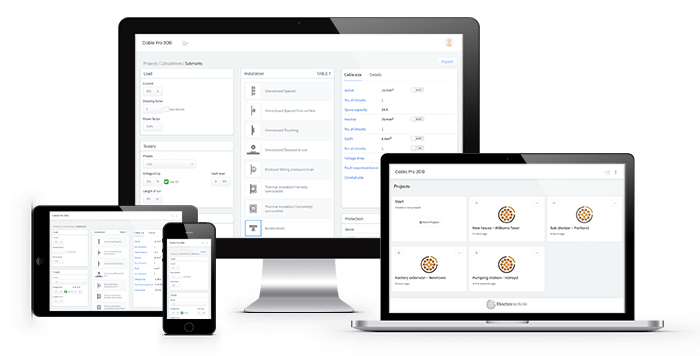
Cable Pro Web is electrical design and cable sizing software for engineers, electricians and contractors. In addition to cable sizing, it includes voltage drop, fault loop impedance, short-circuit verification, protection coordination, maximum demand, cable schedules, cable pulling calculations and interactive single-line diagram.

Unlike JCalc, Cable Pro Web supports S/NZS 3008.1.1:2025, AS/NZS 3008:1.2:2025 and and AS/NZS 3000:2018 (Wiring rules) as well as multiple international standards (NEC, IEC and BS). Calculations are performed in a web browser without software installation, with projects automatically stored in the cloud for access from any device, anytime.

Cable Pro Web includes a free plan and paid plans, adding advanced calculations, professional reports, project management features and cable sizing in ChatGPT and Claude. Its wider range of electrical design tools and standards support make it a comprehensive alternative to JCalc for both individual engineers and engineering teams.

Cable Pro Web Software is well-known and considered the best alternative to JCalc.

Comparison Table: JCalc vs Cable Pro Web

Cable Sizing Software Features

Here’s a quick overview of how Cable Pro Web and JCalc compare.

CABLE PRO WEB JCALC
Pricing
Free Plan [100 daily calculations]
(cable sizing, max demand)
$99/yr [500 daily calculations]
(advanced cable sizing, max demand)
$290/yr [1500 daily calculations]
(advanced cable sizing, harmonics analysis, auto max demand, cable schedule report, voltage rise report, protection coordination + manufacturer database, cable pulling calculator, arc flash calculator, Australian standards access)
$650/yr [5000 daily calculations]
(all the above features + LV network calculator)
- Monthly plans available
- 50% discount on additional seats
Free
(no reports or saving)
$265/yr
(cable sizing, maximum demand, arc flash)
- No monthly plans
Features
- Cable sizing calculator
- Max demand calculator
- Electrical network design with interactive single line diagrams
- Protection coordination
- Cable pulling calculations
- Arc flash calculator
- Voltage rise reports
- Excel cable schedules
- Email reports in the app
- Collaborate with team members on projects
- Harmonics analysis
- Excel add-in
- Step-by-step calculations
- Use on any device
- Cable sizing calculator
- Max demand calculator
- Arc flash calculator
- Use on any device
Cable Sizing Calculator
- Load: Linear and Non-linear loads (with harmonics)
- Insulation: Thermoplastic/PVC, XLPE, Elastomer, Flexible cords, Mineral insulated, Aerial cables
- Load: Linear loads only
- Insulation: Thermoplastic/PVC, XLPE, Elastomer
Standards
- AS/NZS 3008.1.1:2025
- AS/NZS 3008.1.1:2017
- AS/NZS 3008.1.2:2017
- AS/NZS 3000:2018
- BS 7671 – 18th Edition
- IEC 60364-5-52:2009
- NEC/NFPA-70 (2026)
- Arc flash standards
- AS/NZS 3008.1.1:2017
- AS/NZS 3008.1.2:2017
- AS/NZS 3000:2018
- Arc flash standards
Additions
- Database of protective devices (50,000+) from major manufacturers
- Library of electrical standards for download
- Misc. free calculators for motors, transformers, and generators.
AI Integrations
- ChatGPT and Claude AI MCP
- None
Customer Support
- Live chat
- Phone and email support
- Engineering support
- Online documentation
- In-app tours
- Video tutorials
- Trainings
- Email-based calculator support for paid users
Ease of Use
- User-friendly interface
- Easy sidebar navigation
- Recent calculations and projects
- Search, sort, and archive projects
- Visual interface
- Slightly confusing layout
- Steeper learning curve
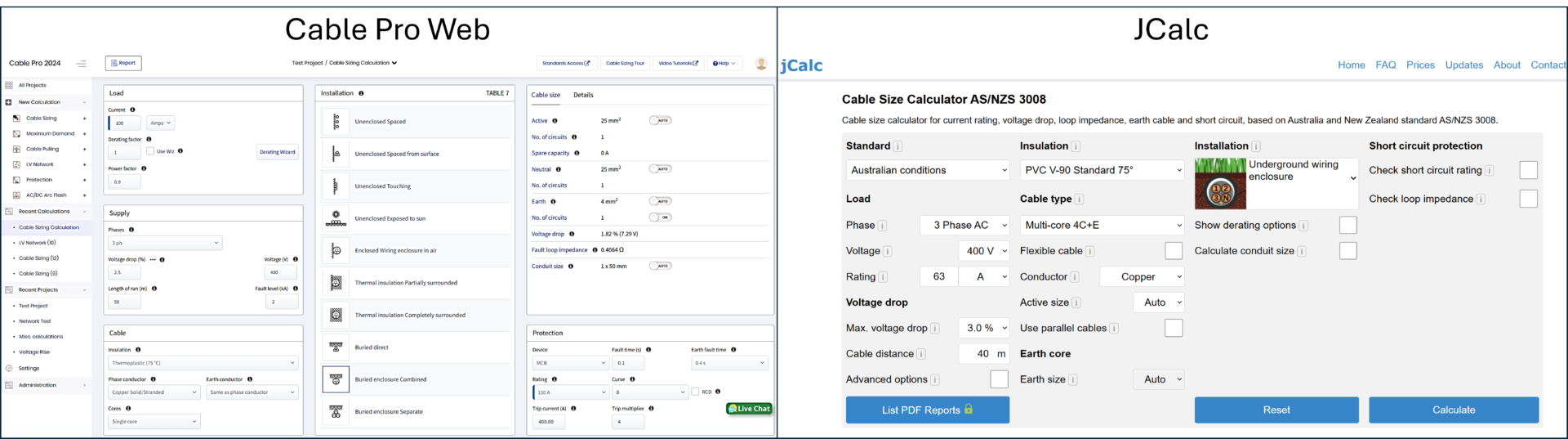
Screenshots of the cable sizing calculator software Cable Pro Web and JCalc side by side

Create a Free Cable Pro Web account, and see for yourself.

Summary: Which Cable Sizing Software is Best for AS/NZS 3008 Standards?

JCalc provides cable sizing for Australian standards and is suitable for users who primarily need AS/NZS 3008 calculations.

However, if you need a broader range of features, support for multiple standards, and advanced tools such as LV network design, arc flash, cable pulling calculations, enhanced reporting, premium support and cable sizing in ChatGPT and Claude, Cable Pro Web is the better choice. Cable Pro Web is also more cost-effective, offering a free plan and flexible paid options to suit your needs.

Ultimately, your choice should be guided by your specific project requirements, the standards you must comply with, and the range of features you need for your electrical design workflow.

Detailed Cable Sizing Software Comparison

JCalc vs Cable Pro Web: Features

Feature CABLE PRO WEB JCALC
Auto size - active and earth
Jcalc auto size earth only based on table 5.1
A green check mark icon on a white background. A green check mark icon on a white background.
Manual size selection
Jcalc cannot specify earth size if active size is set to auto.
A green check mark icon on a white background. A yellow and white logo with a circle in the middle.
1ph, 2ph, 3ph and DC supply
A green check mark icon on a white background. A green check mark icon on a white background.
Accurate AC/DC voltage drop
A green check mark icon on a white background. A green check mark icon on a white background.
Voltage rise calculations
A green check mark icon on a white background. A red x on a white background.
Short-circuit performance check A green check mark icon on a white background. A green check mark icon on a white background.
All cable types
Both CPW and Jcalc include XLPE, PVC, fire cables. CPW has additionally flexible and aerial cables. Jcalc also has high temperature cables.
A green check mark icon on a white background. A green check mark icon on a white background.
Aerial cables
A green check mark icon on a white background. A red x on a white background.
Specify earth conductor as copper or aluminium
Jcalc cannot specify earth size if active size is set to auto.
A green check mark icon on a white background. A yellow and white logo with a circle in the middle.
All installation methods A green check mark icon on a white background. A green check mark icon on a white background.
Fault loop impedance A green check mark icon on a white background. A green check mark icon on a white background.
Conduit size A green check mark icon on a white background. A green check mark icon on a white background.
Derating Wizard A green check mark icon on a white background. A green check mark icon on a white background.
Protective devices - Simple A green check mark icon on a white background. A green check mark icon on a white background.
Protective devices - Manufacturer with time-current curves A green check mark icon on a white background. A red x on a white background.
Direct to Excel cable schedule reports A green check mark icon on a white background. A red x on a white background.

Maximum Demand Calculator

Feature CABLE PRO WEB JCALC
Single domestic A green check mark icon on a white background. A green check mark icon on a white background.
Blocks of living units A green check mark icon on a white background. A green check mark icon on a white background.
Industrial installations A green check mark icon on a white background. A green check mark icon on a white background.
All load groups and load types from Standard A green check mark icon on a white background. A green check mark icon on a white background.
Different supply voltage levels A green check mark icon on a white background. A red x on a white background.
Custom diversity factors A green check mark icon on a white background. A red x on a white background.
Easy-to-use User Interface
This is a very useful and time-saving feature.
A green check mark icon on a white background. A red x on a white background.

LV Electrical Network Design

Feature CABLE PRO WEB JCALC
Supply sizing - Transformer & generator sizing A green check mark icon on a white background. A red x on a white background.
Multiple switchboards & loads A green check mark icon on a white background. A red x on a white background.
Cable sizing for all cables A green check mark icon on a white background. A red x on a white background.
Auto maximum demand for switchboards A green check mark icon on a white background. A red x on a white background.
Fault level calculations as per IEC 60909
Jcalc has separate calculators for calculating transformer and generator fault current
A green check mark icon on a white background. A red x on a white background.
Accumulated voltage drop of each network path A green check mark icon on a white background. A red x on a white background.
Fault loop impedance of each network path A green check mark icon on a white background. A red x on a white background.
Power factor correction (capacitor bank sizing) A green check mark icon on a white background. A red x on a white background.
Manufacturer protective devices database A green check mark icon on a white background. A red x on a white background.
Validation of network design A green check mark icon on a white background. A red x on a white background.
Single line diagram with CAD file exporting A green check mark icon on a white background. A red x on a white background.
Protection coordination study A green check mark icon on a white background. A red x on a white background.
Arc flash A green check mark icon on a white background. A red x on a white background.
Harmonics (coming soon) A green check mark icon on a white background. A red x on a white background.

Create a Free Cable Pro Web account, and see for yourself.

Protective Device Selection & Coordination

Feature CABLE PRO WEB JCALC
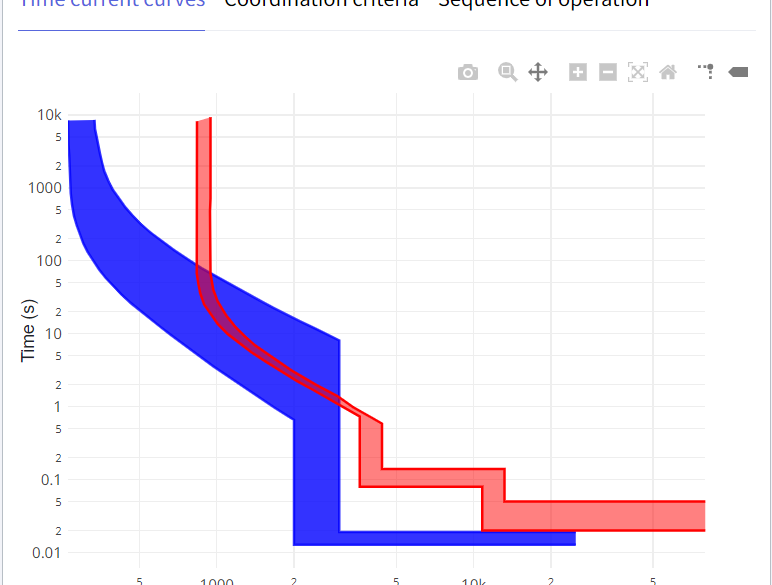
Time current curves A green check mark icon on a white background. A red x on a white background.
Manufacturer Protective Devices Database A green check mark icon on a white background. A red x on a white background.
Coordination criteria & sequence of operation A green check mark icon on a white background. A red x on a white background.
Detailed device settings and reports A green check mark icon on a white background. A red x on a white background.

Cable Pulling Calculations

Feature CABLE PRO WEB JCALC
Tension calculation A green check mark icon on a white background. A red x on a white background.
Sidewall pressure calculation A green check mark icon on a white background. A red x on a white background.
Range of cable pulling sections A green check mark icon on a white background. A red x on a white background.
Checks for clearance and cable jamming A green check mark icon on a white background. A red x on a white background.
Identifying the requirement and location of rollers and push/pull machines A green check mark icon on a white background. A red x on a white background.

Arc Flash Calculations

Feature CABLE PRO WEB JCALC
Standards (IEEE, ENA NENS, DGUV, Stokes, Maximum Power)
Jcalc uses IEEE 1584 method. Additonally has the Ralph Lee method which CPW does not have.
A green check mark icon on a white background. A red x on a white background.
Arc flash calculations for DC A green check mark icon on a white background. A red x on a white background.
Arc flash and incident energy analysis A green check mark icon on a white background. A green check mark icon on a white background.
PPE Category
Jcalc considers only NFPA 70 PPE categories.
A green check mark icon on a white background. A green check mark icon on a white background.
PPE requirements A green check mark icon on a white background. A red x on a white background.
Arc Hazard labels A green check mark icon on a white background. A red x on a white background.

Reporting

Feature CABLE PRO WEB JCALC
Detailed PDF reporting A green check mark icon on a white background. A green check mark icon on a white background.
Includes references to Standards A green check mark icon on a white background. A green check mark icon on a white background.
Print all reports in a project (single click) A green check mark icon on a white background. A red x on a white background.
Include your Company Logo A green check mark icon on a white background. A green check mark icon on a white background.
Custom report fields A green check mark icon on a white background. A red x on a white background.
Email report within the app A green check mark icon on a white background. A green check mark icon on a white background.
Cable Scheduling A green check mark icon on a white background. A red x on a white background.
Voltage rise reports A green check mark icon on a white background. A red x on a white background.

Cloud

Feature CABLE PRO WEB JCALC
No installation A green check mark icon on a white background. A green check mark icon on a white background.
No licence activation A green check mark icon on a white background. A green check mark icon on a white background.
Access on any device via browser A green check mark icon on a white background. A green check mark icon on a white background.
Always up-to-date with the latest Standards and features A green check mark icon on a white background. A green check mark icon on a white background.
Saves calculations A green check mark icon on a white background. A green check mark icon on a white background.
Projects and Calculations sharing A green check mark icon on a white background. A red x on a white background.
Company accounts (coming soon) A green check mark icon on a white background. A red x on a white background.

Other Calculations

Feature CABLE PRO WEB JCALC
Motor current A red x on a white background. A green check mark icon on a white background.
Motor speed A red x on a white background. A green check mark icon on a white background.
Motor torque A red x on a white background. A green check mark icon on a white background.
Transformer Full load current
CPW calculates this in the LV Networks module
A green check mark icon on a white background. A green check mark icon on a white background.
Transformer fault current A green check mark icon on a white background. A green check mark icon on a white background.
Generator Full load current
CPW calculates this in the LV Networks module
A green check mark icon on a white background. A green check mark icon on a white background.
Generator fault current A green check mark icon on a white background. A green check mark icon on a white background.
Battery sizing A red x on a white background. A green check mark icon on a white background.
Full load current A green check mark icon on a white background. A green check mark icon on a white background.
Three-phase power A green check mark icon on a white background. A green check mark icon on a white background.

Create a Free Cable Pro Web account, and see for yourself.

Cable Pro Web

Cable sizing and maximum demand software in the cloud. No installation, use on any device.

Related Articles:

Seven major changes in AS/NZS 3008.1.1:2025 for cable sizing — new DC tables, multi-row correction factors, 110 °C aluminium ratings, voltage rise, and short-circuit limits.
Learn how to size wires using NEC (NFPA 70) with step-by-step calculation examples, including ampacity, voltage drop, OCPD, and EGC sizing.
Advanced voltage drop calculations for electrical cables. Learn how power factor, cable temperature, impedance, motors, and installation conditions affect voltage drop.
Learn how to set priorities and adjust protective devices for selective coordination to isolate faults and minimise outages in electrical systems.
Learn how to set and coordinate circuit breakers to meet AS/NZS 3000:2018, ensuring faults are isolated quickly and safely in electrical systems.
Size active, neutral, and earth cables using AS/NZS 3008. The guide covers current capacity, voltage drop, and short-circuit calculations with examples.

Print this article:

Print
Cable Pro Web Software
Cable Pro Web

Cable sizing, maximum demand, LV network design, protection coordination, cable pulling, and arc flash calculations.

As used by:

Cable Pro Web Clients