












CYMCAP vs. ELEK Cable HV Software

CYMCAP vs ELEK Cable HV: A Modern Alternative for Cable Rating Software

Table of Contents

Best CYMCAP Alternative (2026): ELEK Cable HV vs CYMCAP Comparison

Looking for a CYMCAP alternative? This detailed comparison explains the differences between ELEK Cable HV and CYMCAP for high-voltage cable ratings, IEC 60287 calculations, and thermal analysis. Engineers use this guide to evaluate accuracy, features, and usability.

About CYMCAP

CYMCAP Software was developed in the 1990s by CYME International T&D and is a widely recognised software tool for analysing ampacity and thermal performance in high-voltage power cable systems. It offers comprehensive capabilities for assessing the current carrying capacity of cables under various operating conditions, accounting for factors such as cable configuration, installation conditions, and environmental variables.

About ELEK Cable HV

ELEK Cable HV is a modern alternative to CYMCAP, offering a wide range of features, an intuitive user interface, flexible licensing, and competitive pricing. Developed since 2010, it is a mature and proven solution.

It performs steady-state and transient cable rating calculations in accordance with the Neher-McGrath method and IEC 60287 and IEC 60853 standards, with accuracy validated against published CIGRE technical brochures.

ELEK Cable HV is widely used by engineers as an alternative to CYMCAP.

Start a Free 14-day Trial of ELEK Cable HV Software.

About the comparison

ELEK Cable HV Version 9.0.1. Date of release: March 2026
CYMCAP Version 9.1 Date of release: November 2025

This comparison is based on internal evaluations and publicly available information for the listed software versions. Capabilities may vary depending on configuration, modules, and updates. Readers should verify specific features with the software vendors.

These Power utilities and government use Cable High Voltage Software™️

These Consulting companies use Cable High Voltage Software™️

These Construction companies use Cable High Voltage Software™️

These Manufacturers and suppliers use Cable High Voltage Software™️

These Mining companies use Cable High Voltage Software™️

Logo of AusNet Services featuring a stylized, colorful geometric design above the company name in grey lettering and a cable sizing calculator icon. A logo with the words 50 hertz ellia group. Energy queensland logo on a grey background. A logo with black and orange lines. A logo with red and yellow lines. Engie logo on a gray background. The national grid logo on a gray background.
Aecom logo on a gray background. The dnv logo on a gray background. A card with the word rio tinto on it. CHV QUADRANTE - CYMCAP vs. ELEK Cable HV Software CHV SMEC - CYMCAP vs. ELEK Cable HV Software
CHV BAYWA - CYMCAP vs. ELEK Cable HV Software CHV EDL - CYMCAP vs. ELEK Cable HV Software CHV LIGHTSOURCE BP - CYMCAP vs. ELEK Cable HV Software CHV MATRIX GROUP - CYMCAP vs. ELEK Cable HV Software CHV SSE RENEWABLES - CYMCAP vs. ELEK Cable HV Software CHV UGL - CYMCAP vs. ELEK Cable HV Software
CHV GE POWER CONVERSION - CYMCAP vs. ELEK Cable HV Software CHV PRYSMIAN UPDATE - CYMCAP vs. ELEK Cable HV Software CHV SIEMENS - CYMCAP vs. ELEK Cable HV Software CHV STERLITE POWER - CYMCAP vs. ELEK Cable HV Software
CP BHP - CYMCAP vs. ELEK Cable HV Software CP Fortescue - CYMCAP vs. ELEK Cable HV Software CHV NEWMONT - CYMCAP vs. ELEK Cable HV Software CHV RioTinto - CYMCAP vs. ELEK Cable HV Software
Compare

Why choose ELEK Cable HV over CYMCAP?

ELEK Cable HV includes many capabilities as standard that are offered as optional modules in CYMCAP, and also provides additional functionality beyond CYMCAP.

ELEK Software Logo

ELEK CABLE HV

Logo with the word "CYME" in bold blue letters and a faint gray waveform line running horizontally beneath the text.

CYMCAP

General Features

Feature ELEK Cable HV CYMCAP
IEC 60287:2023 calculations Green checkmark inside a green circle on a light background, symbolizing approval or confirmation.

Yes

Green checkmark inside a green circle on a light background, symbolizing approval or confirmation.

Yes

Validated with CIGRE TB 880
tooltip icon - CYMCAP vs. ELEK Cable HV Software
ELEK Cable HV is validated against the TB 880 case studies and yields results that match to 11 decimal places. The software ships with the case study files. CYMCAP did not produce exact matchies in several cases. Refer to their documentation.
Green checkmark inside a green circle on a light background, symbolizing approval or confirmation.

Yes

Case 9 shows a difference in the first-layer diameter surrounding the three cores because it is a calculated parameter rather than a user input.

CIGRE TB 880 validation study

A yellow semi-circular ring forms the right half of a circle, with the left half shown in a light beige color.

Yes - Partial validation

In Case 0, differences are attributed to the treatment of eddy-current losses.

The trefoil formation in Cases 1 and 5 has minor differences.

Cases 2, 8 and 9 have a difference attributed to the difference in the calculation of the diameter of the first layer surrounding the three cores.

CIGRE TB 908 (2023) accurate 3-core armour loss calculations
tooltip icon - CYMCAP vs. ELEK Cable HV Software
ELEK Cable HV performs accurate armour loss calculations.
Green checkmark inside a green circle on a light background, symbolizing approval or confirmation.

Yes

Green checkmark inside a green circle on a light background, symbolizing approval or confirmation.

Yes

Live (instant) calculations
tooltip icon - CYMCAP vs. ELEK Cable HV Software
In the evaluated version, CYMCAP requires manual recalculation after input changes, whereas ELEK Cable HV updates results automatically.
Green checkmark inside a green circle on a light background, symbolizing approval or confirmation.

Yes

A red "X" mark centered on a light beige circular background, indicating an error or incorrect action.

No

Number of users
tooltip icon - CYMCAP vs. ELEK Cable HV Software
ELEK Cable HV software can be installed onto any number of computers and used by up to 2 users at a time per licence.
2 users at the same time 1 user at a time
Network licence
tooltip icon - CYMCAP vs. ELEK Cable HV Software
ELEK uses flexible software-based protection, not hardware-based dongles.
Green checkmark inside a green circle on a light background, symbolizing approval or confirmation.

Yes

Green checkmark inside a green circle on a light background, symbolizing approval or confirmation.

Yes

Easy-to-use user interface

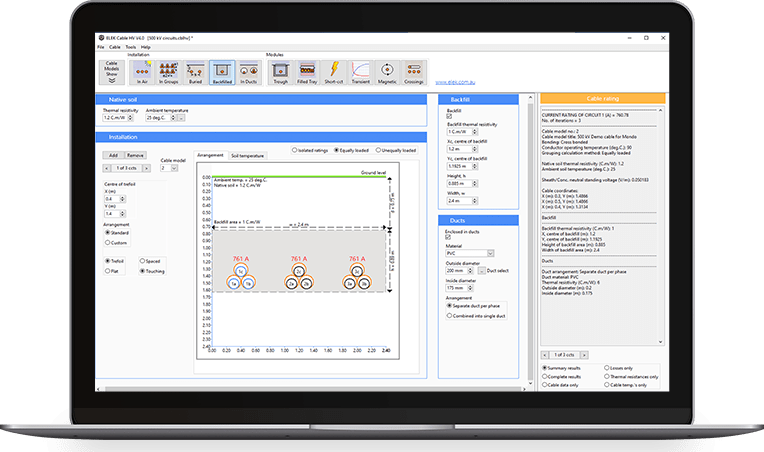
Modern and intuitive user interface with drag-and-drop functionality, with near-instant updates to results.

Multiple projects can be combined into a single file using tabs.

Drag-and-drop functionality was not identified in the evaluated version of CYMCAP.

Installation Methods

Feature ELEK Cable HV CYMCAP
In Air
tooltip icon - CYMCAP vs. ELEK Cable HV Software
ELEK Cable HV performs air-cable ratings for single circuits or groups per IEC 60287.

Unenclosed or enclosed.

Solar radiation calculator based on the ASHRAE model.
Green checkmark inside a green circle on a light background, symbolizing approval or confirmation.

Yes

Google Maps integration for precise solar radiation calculations.

Green checkmark inside a green circle on a light background, symbolizing approval or confirmation.

Yes

Buried Direct, In Backfill, In Ducts
tooltip icon - CYMCAP vs. ELEK Cable HV Software
In the evaluated configuration, CYMCAP applies IEC 60287 soil dry-out calculations to single circuits, whereas ELEK Cable HV extends this to multiple circuits.
Green checkmark inside a green circle on a light background, symbolizing approval or confirmation.

Yes

Soil dryout for multiple buried circuits - IEC 60287 has been extended.

Soil dryout within backfills, as well as soil dryout prevention analysis.

Supports an unlimited number of circuits of different cable types.

Green checkmark inside a green circle on a light background, symbolizing approval or confirmation.

Yes

CYMCAP applies IEC 60287 soil-dry-out calculations to single circuits.

Soil dryout for cables installed in backfill is not supported.

The MDB add-on module is required for soil dryout prevention analysis.

The evaluated CYMCAP configuration supports up to 50 buried circuits.

Soil Temperature
Green checkmark inside a green circle on a light background, symbolizing approval or confirmation.

Yes

Advantages: Actual and rise above ambient (for submarine), and a special Excel export.

Green checkmark inside a green circle on a light background, symbolizing approval or confirmation.

Yes

Unfilled Troughs
Green checkmark inside a green circle on a light background, symbolizing approval or confirmation.

Yes

Advantages: Multiple groups of circuits of different cable types.

Green checkmark inside a green circle on a light background, symbolizing approval or confirmation.

Yes - Optional add-on

Ventilated Tunnels
tooltip icon - CYMCAP vs. ELEK Cable HV Software
ELEK Cable HV supports multiple circuits of a single cable type (single core or multicore). Unventilated and ventilated. Vary the tunnel length.
Green checkmark inside a green circle on a light background, symbolizing approval or confirmation.

Yes

Green checkmark inside a green circle on a light background, symbolizing approval or confirmation.

Yes - Optional add-on

Advantages: Supports multiple circuits of different cable types.

Risers and J-tubes
tooltip icon - CYMCAP vs. ELEK Cable HV Software
ELEK Cable HV provides multiple configurations for riser poles and J-tube installations for single-core or three-core cables. Wind speed, duct size and material types, and solar radiation exposure can be considered.
Green checkmark inside a green circle on a light background, symbolizing approval or confirmation.

Yes

Green checkmark inside a green circle on a light background, symbolizing approval or confirmation.

Yes - Optional add-on

Submarine
Green checkmark inside a green circle on a light background, symbolizing approval or confirmation.

Yes

Model cables fully or partially immersed in water, buried directly, or buried in ducts in the seabed.

Green checkmark inside a green circle on a light background, symbolizing approval or confirmation.

Yes - Optional add-on

Model cables fully or partially immersed in water or buried in the seabed.

Finite Element Method (FEM)
tooltip icon - CYMCAP vs. ELEK Cable HV Software
ELEK Cable HV provides a flexible, powerful, and fully interactive FEM calculation that can model a wide range of cable arrangements extending beyond standard IEC 60287 analytical methods.

The FEM of ELEK Cable HV is validated with CIGRE TB 908.
Green checkmark inside a green circle on a light background, symbolizing approval or confirmation.

Yes

Advantages: Accounts for ground-surface convection for accurate shallow-buried cable ratings.

No predefined limit on the number of circuits, objects, or elements within practical computational constraints.

FEM calculations tutorial

Green checkmark inside a green circle on a light background, symbolizing approval or confirmation.

Yes - Optional add-on

According to available documentation, the CYMCAP MDB module supports up to 60,000 elements.

Try ELEK Cable HV Software for free and see the difference for yourself.

Modules

Feature ELEK Cable HV CYMCAP
Bonding Arrangements
tooltip icon - CYMCAP vs. ELEK Cable HV Software
ELEK Cable HV supports solidly, single-point, or cross-bonded systems.
Sheath circulating currents and standing voltages are displayed.
Green checkmark inside a green circle on a light background, symbolizing approval or confirmation.

Yes

Green checkmark inside a green circle on a light background, symbolizing approval or confirmation.

Yes

Transient - Cyclic and Emergency Ratings
tooltip icon - CYMCAP vs. ELEK Cable HV Software
ELEK Cable HV performs transient calculations in accordance with IEC 60853-2.
Cyclic ratings to IEC and Neher-McGrath with custom load factor (profile).
Emergency ratings to IEC.
Calculate ratings based on a maximum emergency temperature and cyclic ratings using custom load profiles.
Green checkmark inside a green circle on a light background, symbolizing approval or confirmation.

Yes

Green checkmark inside a green circle on a light background, symbolizing approval or confirmation.

Yes

Multiple Cable Crossings
tooltip icon - CYMCAP vs. ELEK Cable HV Software
ELEK Cable HV provides multiple (more than 2 circuits) cable crossings calculations beyond the limitations of IEC 60287-3-3-2007 and includes crossing heat sources.
Green checkmark inside a green circle on a light background, symbolizing approval or confirmation.

Yes

Advantages: ELEK Cable HV can model multiple crossing circuits without a predefined limit.

Green checkmark inside a green circle on a light background, symbolizing approval or confirmation.

Yes - Optional add-on

CYMCAP supports modelling of up to two crossing circuits.

Magnetic Fields
tooltip icon - CYMCAP vs. ELEK Cable HV Software
ELEK Cable HV automatically imports the cables and currents from a study.
Green checkmark inside a green circle on a light background, symbolizing approval or confirmation.

Yes

Advantages: Can model single-core and multicore cables.

Exact theory equations for multicore cables.

Green checkmark inside a green circle on a light background, symbolizing approval or confirmation.

Yes - Optional add-on

Sequence Impedances
Green checkmark inside a green circle on a light background, symbolizing approval or confirmation.

Yes

Green checkmark inside a green circle on a light background, symbolizing approval or confirmation.

Yes - Optional add-on

Short Circuit Calculations to IEC 949
tooltip icon - CYMCAP vs. ELEK Cable HV Software
ELEK Cable HV performs adiabatic and non-adiabatic calculations.
The permissible short-circuit temperature limit of materials can be customised.
Green checkmark inside a green circle on a light background, symbolizing approval or confirmation.

Yes

Green checkmark inside a green circle on a light background, symbolizing approval or confirmation.

Yes - Optional add-on

Multiple Casings
tooltip icon - CYMCAP vs. ELEK Cable HV Software
ELEK Cable HV can model a variety of casings with different cable types in ducts or pipes of any material. Filled or unfilled (air-filled).
Green checkmark inside a green circle on a light background, symbolizing approval or confirmation.

Yes

Advantages: Uses numerical methods of calculation based on FEM.

Green checkmark inside a green circle on a light background, symbolizing approval or confirmation.

Yes - Optional add-on

Can model cables installed in ducts inside concrete pipes.

Uses analytical methods for calculation.

Soil Dryout Prevention
Green checkmark inside a green circle on a light background, symbolizing approval or confirmation.

Yes

Advantages: Can be used in conjunction with either FEM or IEC calculations.

Advanced soil dry-out calculations technical article

Green checkmark inside a green circle on a light background, symbolizing approval or confirmation.

Yes - Optional add-on

Must be used with the Multiple Duct Bank (MDB) module.

HVDC Calculations
Green checkmark inside a green circle on a light background, symbolizing approval or confirmation.

Yes

Calculate the maximum temperature drop allowed by the insulation kV/mm.

Database of pre-modelled HVDC 320 kV and 525 kV rated cables.

HVDC cable ampacity technical article

Green checkmark inside a green circle on a light background, symbolizing approval or confirmation.

Yes

Dynamic Ratings & Transient Temperature Response
Green checkmark inside a green circle on a light background, symbolizing approval or confirmation.

Yes

Green checkmark inside a green circle on a light background, symbolizing approval or confirmation.

Yes

Earth Continuity Conductor (ECC)
Green checkmark inside a green circle on a light background, symbolizing approval or confirmation.

Yes

Optimal ECC positions.

Circulating currents calculation.

A red "X" mark centered on a light beige circular background, indicating an error or incorrect action.

No

Duct Bank Optimiser
A yellow semi-circular ring forms the right half of a circle, with the left half shown in a light beige color.

No - Under development

Green checkmark inside a green circle on a light background, symbolizing approval or confirmation.

Yes

Parametric Study Module
A yellow semi-circular ring forms the right half of a circle, with the left half shown in a light beige color.

No - Under development

Green checkmark inside a green circle on a light background, symbolizing approval or confirmation.

Yes

3D Modelling
A yellow semi-circular ring forms the right half of a circle, with the left half shown in a light beige color.

No - Under development

Green checkmark inside a green circle on a light background, symbolizing approval or confirmation.

Yes

Real Time Thermal Rating Module
A red "X" mark centered on a light beige circular background, indicating an error or incorrect action.

No

Green checkmark inside a green circle on a light background, symbolizing approval or confirmation.

Yes

Cable Modelling

Feature ELEK Cable HV CYMCAP
AI cable modelling from PDF datasheets
tooltip icon - CYMCAP vs. ELEK Cable HV Software
ELEK uses advanced AI to ingest cable manufacturer PDF datasheets and automatically generate highly accurate cable models, reducing manual data entry and associated risk of human error.
Green checkmark inside a green circle on a light background, symbolizing approval or confirmation.

Yes - ELEK AI account is required
(included with the Professional version)

A red "X" mark centered on a light beige circular background, indicating an error or incorrect action.

No

Graphical cable editing Green checkmark inside a green circle on a light background, symbolizing approval or confirmation.

Yes

Green checkmark inside a green circle on a light background, symbolizing approval or confirmation.

Yes

Database of pre-modelled cables Green checkmark inside a green circle on a light background, symbolizing approval or confirmation.

Yes

Huge database (1500+) of pre-modelled
cables from LV to 500 kV.

Green checkmark inside a green circle on a light background, symbolizing approval or confirmation.

Yes

Metric (IEC 60228), kcmil (IEC 62602), or custom conductors
tooltip icon - CYMCAP vs. ELEK Cable HV Software
ELEK Cable HV includes new larger metric conductor sizes from IEC 60228:2023.
Green checkmark inside a green circle on a light background, symbolizing approval or confirmation.

Yes

Green checkmark inside a green circle on a light background, symbolizing approval or confirmation.

Yes

Custom ks and kp values Green checkmark inside a green circle on a light background, symbolizing approval or confirmation.

Yes

Green checkmark inside a green circle on a light background, symbolizing approval or confirmation.

Yes

Calculate DC resistance Green checkmark inside a green circle on a light background, symbolizing approval or confirmation.

Yes

Green checkmark inside a green circle on a light background, symbolizing approval or confirmation.

Yes

Sector-shaped conductors Green checkmark inside a green circle on a light background, symbolizing approval or confirmation.

Yes

Green checkmark inside a green circle on a light background, symbolizing approval or confirmation.

Yes

Custom layers Green checkmark inside a green circle on a light background, symbolizing approval or confirmation.

Yes

Green checkmark inside a green circle on a light background, symbolizing approval or confirmation.

Yes

Sheath and screen around each core Green checkmark inside a green circle on a light background, symbolizing approval or confirmation.

Yes

Green checkmark inside a green circle on a light background, symbolizing approval or confirmation.

Yes

Jacket around each core Green checkmark inside a green circle on a light background, symbolizing approval or confirmation.

Yes

Green checkmark inside a green circle on a light background, symbolizing approval or confirmation.

Yes

HVDC cables Green checkmark inside a green circle on a light background, symbolizing approval or confirmation.

Yes

Green checkmark inside a green circle on a light background, symbolizing approval or confirmation.

Yes

Pipe-type cables Green checkmark inside a green circle on a light background, symbolizing approval or confirmation.

Yes

Green checkmark inside a green circle on a light background, symbolizing approval or confirmation.

Yes

Submarine cables Green checkmark inside a green circle on a light background, symbolizing approval or confirmation.

Yes

Green checkmark inside a green circle on a light background, symbolizing approval or confirmation.

Yes

Double armoured cables Green checkmark inside a green circle on a light background, symbolizing approval or confirmation.

Yes

Green checkmark inside a green circle on a light background, symbolizing approval or confirmation.

Yes

Try ELEK Cable HV Software for free and see the difference for yourself.

Reporting

Feature ELEK Cable HV CYMCAP
Comprehensive PDF reports Green checkmark inside a green circle on a light background, symbolizing approval or confirmation.

Yes

Green checkmark inside a green circle on a light background, symbolizing approval or confirmation.

Yes

Microsoft Excel reports
tooltip icon - CYMCAP vs. ELEK Cable HV Software
In CYMCAP the Excel reporting function is an add-on that costs extra.
Green checkmark inside a green circle on a light background, symbolizing approval or confirmation.

Yes

Green checkmark inside a green circle on a light background, symbolizing approval or confirmation.

Yes

Equations in reports
tooltip icon - CYMCAP vs. ELEK Cable HV Software
ELEK Cable HV does not currently include any equations in the reports. However, all the intermediate calculation results are provided.
A red "X" mark centered on a light beige circular background, indicating an error or incorrect action.

No

Green checkmark inside a green circle on a light background, symbolizing approval or confirmation.

Yes - Provides simple equations

Conclusion

While CYMCAP remains a widely used tool for cable rating calculations, ELEK Cable HV offers a more modern, efficient approach to high-voltage cable system modelling.

With instant calculation updates, flexible FEM-based modelling, and a streamlined user interface, ELEK Cable HV enables engineers to model complex installations more efficiently while maintaining alignment with established industry methods such as IEC 60287 and IEC 60853.

For organisations looking to improve productivity and modelling flexibility, ELEK Cable HV provides a compelling alternative to CYMCAP.

Cable HV Software

Custom cable ratings for a wide range of installation conditions.

Related Articles:

Print this article:

Print
Cable HV Software
Cable HV Software

Custom cable ratings for a wide range of installation conditions.

As used by:

The logos for Rio Tinto and GDD feature electrical power.